0%

Vuex.Store

1
2
import Vuex from 'vuex'
const store = new Vuex.Store({ ...options })

Vuex.Store 构造器选项

state

  • 类型: Object | Function
    Vuex store 实例的根 state 对象

    如果传入返回一个对象的函数, 其返回的对象会被用作根 state.

mutations

  • 类型: { [type: string ]: Function }
    在 store 上注册 mutation, 处理函数总是接受 state 作为第一个参数(如果定义在模块中, 则为模块的局部状态), payload作为第二个参数

sctions

  • 类型: { [type: string]: Function }
    在 store 上注册 action. 处理函数总是接受 context 作为第一个参数, payload 作为第二个参数

    context 对象包含以下属性:

    1
    2
    3
    4
    5
    6
    7
    8
    {
    state, // 等同于 `store.state`,若在模块中则为局部状态
    rootState, // 等同于 `store.state`,只存在于模块中
    commit, // 等同于 `store.commit`
    dispatch, // 等同于 `store.dispatch`
    getters, // 等同于 `store.getters`
    rootGetters // 等同于 `store.getters`,只存在于模块中
    }

getters

  • 类型: { [type: string ]: Function}

    在 store 上注册 getter, getter 方法接受以下参数:

    1
    state, getters

    当定义在一个模块粒时会特别一些:

    1
    2
    3
    4
    state, // 如果在模块中定义则为模块的局部状态
    getters, // 等同于 store.getters
    rootState, // 等同于 store.state
    rootGetters // 所有 getters

    注册的 getter 为暴露为 getters

modules

  • 类型: Object
    包含了子模块的对象, 会被合并到 store
    1
    2
    3
    4
    5
    6
    7
    8
    9
    10
    {
    key: {
    state,
    namespaced?,
    mutations,
    actions?,
    getters?,
    modules?
    }
    }
    与根模块的选项一样, 每个模块也包含 statemutations 选项. 模块的状态使用 key 关联到 store 的根状态. 模块的 mutation 和 getter 只会接受 module 的局部状态作为第一个参数, 而不是根状态, 并且模块的 action 的 context.state 同样指向局部状态

pulgins

  • 类型: Array<Function>
    一个数组, 包含应用在 store 上的插件方法. 这些插件直接接受 store 作为唯一参数, 可以监听 mutation 或者提交 mutation

strict

  • 类型: Boolean
  • 默认值: false
    使 Vuex store 进入严格模式, 在严格模式下, 任何 mutation 处理函数以外修改 Vuex state 都会抛出错误

devtools

  • 类型: Boolean
    为某个特定的 Vuex 实例打开或关闭 devtools. 对于传入 false 的实例来说 Vuex store 不会订阅到 devtools 插件
    1
    2
    3
    {
    devtools: false
    }

Vuex.Store 实例属性

state

  • 类型: Object
    根状态, 只读

getters

  • 类型: Object
    暴露出注册的 getter, 只读

Vuex.Store 实例方法

commit

  • commit(type: string, payload?:any, options?: Object)

  • commit(mutation: Object, options?: Object)

    提交 mutation, options 里可以有 root: true, 它允许在命名空间模块里提交根的 mutation

dispatch

  • dispatch(type: string, payload?:any, options?: Pbject)

  • dispatch(action: Object, options?: Object)

    分发 action. options 里可以有 root: true, 它允许在命名空间模块里分发根的 action. 返回一个解析所有被触发的 action 处理器的 Promise

replaceState

  • replaceState(state: Object)

    替换 store 的根状态, 仅用状态合并或时光旅行调试

wathc

  • watch(fn: Function, callback: Funtion, options?: Object): Function

    响应式的侦听 fn 的返回值, 当值改变时调用回调函数. fn 接受 store 的 state 作为第一个参数, 其 getter 作为第二个参数, 最后接受一个可选对象参数表示 Vue 的vm.$watch方法的参数

    要停止侦听, 调用此方法返回的函数即可停止侦听

subscribe

  • subscribe(handler: Function):Function

    订阅 store 的 mutation. hanlder 会在每个 mutation 完成后调用, 接受 mutation 和经过 mutation 后的状态作为参数

    1
    2
    3
    4
    store.subscribe((mutation, state) => {
    console.log(mutation.type)
    console.log(mutation.paylaod)
    })

    要停止订阅, 调用此方法返回的函数可停止订阅

subscribeAction

  • subscribeAction(handler: Function): Function

    订阅 store 的 action。handler 会在每个 action 分发的时候调用并接收 action 描述和当前的 store 的 state 这两个参数:

    1
    2
    3
    4
    store.subscribeAction((action, state) => {
    console.log(action.type)
    console.log(action.payload)
    })

    要停止订阅,调用此方法返回的函数即可停止订阅。

    从 3.1.0 起,subscribeAction 也可以指定订阅处理函数的被调用时机应该在一个 action 分发之前还是之后 (默认行为是之前):

    1
    2
    3
    4
    5
    6
    7
    8
    store.subscribeAction({
    before: (action, state) => {
    console.log(`before action ${action.type}`)
    },
    after: (action, state) => {
    console.log(`after action ${action.type}`)
    }
    })

registerModule

  • registerModule(path: string | Array<string>, module: Module, options?: Object)

    注册一个动态模块

    options 可以包含 preserveState: true 以允许保留之前的 state。用于服务端渲染。

unregisterModule

  • unregisterModule(path: string | Array<string>)

    卸载一个动态模块。

hotUpdate

  • hotUpdate(newOptions: Object)

    热替换新的 action 和 mutation。详细介绍

组件绑定的辅助函数

mapState

  • mapState(namespace?: string, map: Array<string> | Object<string | Function>): Object

    为组件创建计算属性以返回 Vuex store 中的状态

    第一个参数是可选的, 可以是一个命名空间字符串

    对象形式的第二个参数的成员可以是一个函数

mapGetters

  • mapGetters(namespace?: string, map: Array<string> | Object<string>): Object

    为组件创建计算属性以返回 getter 的返回值

    第一个参数是可选的, 可以是一个命名空间字符串

mapActions

  • mapActions(namespace?: string, map: Array<string> | Object<string | function>): Object

    创建组件方法分发 action

    第一个参数是可选的, 可以是一个命名空间字符串

    对象形式的第二个参数的成员可以是一个函数 function(dispatch: function, ...args: any[])

mapMutations

  • mapMutations(namespace?: string, map: Array<string> | Object<string | function>): Object

    创建组件方法提交的 mutation

    第一个参数是可选的, 可以是一个命名空间字符串

    对象形式的第二个参数的成员可以是一个函数 function(commit: function, ...args: any[])

createNamespacedHelpers

  • createNamespacedHelpers(namespace: string): Object

    创建基于命名空间的组件绑定辅助函数。其返回一个包含 mapState、mapGetters、mapActions 和 mapMutations 的对象。它们都已经绑定在了给定的命名空间上
Module

由于使用单一状态树, 应用的所有状态会集中到一个比较大的对象. 当应用变得非常复杂时, store 对象就有可能变得相当臃肿

为了解决以上问题, Vuex 允许我们将 store 分割成模块. 每个模块拥有自己的 state、Mutation、Action、Getter、甚至是嵌套子模块

1
2
3
4
5
6
7
8
9
10
11
12
13
14
15
16
17
18
19
20
21
22
23
const moduleA = {
state: { ... },
mutaions: { ... },
actions: { ... },
getters: { ... }
}

const moduleB = {
state: { ... },
mutaions: { ... },
actions: { ... },
getters: { ... }
}

const store = new Vuex.Store({
modules: {
a: moduleA,
b: moduleB,
}
})

store.state.a // -> moduleA 的状态
store.state.b // -> moduleB 的状态

模块的局部状态

对于模块内部的 mutaion 和 getter, 接受的第一个参数是模块的局部状态对象

1
2
3
4
5
6
7
8
9
10
11
12
13
14
15
const moduleA = {
state: { count: 0 },
mutaions: {
increment(state) {
// 此处 state 是局部的状态
state.count++
}
},

getters: {
doubleCount(state) {
return state.count * 2
}
}
}

同样, 对于模块内部的 action, 局部状态通过 context.state 暴露出来, 根节点状态则为 context.rootState:

1
2
3
4
5
6
7
8
9
10
const moduleA = {
state: { ... },
actions: {
incrementIfOddOnRootSum({state, commit, rootState}){
if((state.count + rootState.count) % 2 === 1) {
commit('increment')
}
}
}
}

对于模块内部的 getter, 根节点状态会作为第三个参数暴露出来:

1
2
3
4
5
6
7
8
const moduleA = {
// ...
getters: {
sumWithRootCount(state, getters, rootState) {
return state.count + rootState.count
}
}
}

命名空间

默认情况下, 模块内部的 action、mutation 和 getter 是注册在全局命名空间的–这样使得多个模块能够对同一 mutation 或 action 做出反应

如果希望你的模块具有更高的封装度和复用性,你可以通过添加 namespaced: true 的方式使其成为带命名空间的模块。当模块被注册后,它的所有 getter、action 及 mutation 都会自动根据模块注册的路径调整命名

1
2
3
4
5
6
7
8
9
10
11
12
13
14
15
16
17
18
19
20
21
22
23
24
25
26
27
28
29
30
31
32
33
34
35
36
37
38
39
40
const store = new Vuex.Store({
modules: {
account: {
namespaced: true

// 模块内容 (module assets)
state: { ... } // 模块内的状态已经是嵌套的了,使用 `namespaced` 属性不会对其产生影响
getters: {
isAdmin () { ... } // -> getters['account/isAdmin']
},
actions: {
login () { ... } // -> dispatch('account/login')
},
mutations: {
login () { ... } // -> commit('account/login')
},

// 嵌套模块
modules: {
// 继承父模块的命名空间
myPage: {
state: { ... },
getters: {
profile () { ... } // -> getters['account/profile']
}
},

// 进一步嵌套命名空间
posts: {
namespaced: true,

state: { ... },
getters: {
popular () { ... } // -> getters['account/posts/popular']
}
}
}
}
}
})

启用了命名空间的 getter 和 action 会收到局部化的 getter, dispatchcommit. 换言之,你在使用模块内容(module assets)时不需要在同一模块内额外添加空间名前缀。更改 namespaced 属性后不需要修改模块内的代码

在带命名空间的模块内访问全局内容

如果希望使用全局 state 和 getter, rootState 和 ``rootState会作为第三和第四参数传入 getter, 也会通过context对象的属性传入action`

若需要在全局命名空间内分发 action 或提交 mutation, 将 { root: true } 作为第三参数传给 dispatchcommit 即可

1
2
3
4
5
6
7
8
9
10
11
12
13
14
15
16
17
18
19
20
21
22
23
24
25
26
27
28
29
30
31
modules: {
foo: {
namespaced: true,

getters: {
// 在这个模块的 getter 中, getters 被局部化了
// 可以使用 getter 的第四个参数来调用 rootGetters
someGetter( state, getters, rootState, rootGetters) {
getters.someOtherGetter // -> foo/someOtherGetter
rootGetters.someOtherGetter // -> someOtherGetter
},
someOtherGetter: state => { ... }
},

acctions: {
// 在这个模块中, dispatch 和 commit 也被局部化了
// 他们可以接受 root 属性以访问根 dispatch 或 commit
someAction({dispatch, commit, getters, rootGetters}) {
getters.somegetter // -> foo/somegetter
rootGetters.someGetter // -> somegetter

dispatch('someOtherAction') // -> foo/someOtherAction
dispatch('someOtherAction', null, { root: true }) // -> someOtherAction

commit('someMutation') // -> foo/someMutation
commit('someMutation', null, { root: true }) // -> someMutation
},
someOtherAction(ctx, payload) { ... }
}
}
}

在带命名空间的模块注册全局 action

若要在带命名空间的模块注册全局 action, 可以添加 root: true, 并将这个 action 定义放在函数 handler

1
2
3
4
5
6
7
8
9
10
11
12
13
14
15
16
17
18
19
{
actions: {
someOtherAction({dispatch}) {
dispatch('someAction')
}
},
modules: {
foo: {
namespaced: true

actions: {
someAction: {
root: true,
handler( namespacedContext, patload) { ... } // -> someAction
}
}
}
}
}

带命名空间的绑定函数

当使用 mapStatemapgettersmapActionsmapMutations 这些函数来绑定带命名空间的模块时, 写起来可能比较繁琐

1
2
3
4
5
6
7
8
9
10
11
12
computed: {
...mapState({
a: state => state.some.nested.module.a,
b: state => state.some.nested.module.b,
})
}
methods: {
...mapActions([
'some/nested/module/foo', // -> this['some/nested/module/foo']()
'some/nested/module/bar' // -> this['some/nested/module/bar']()
)]
}

对于上述情况, 可以将模块的空间名称字符串作为第一个参数传递给上述函数, 这样所有绑定都会自动将该模块作为上下文

1
2
3
4
5
6
7
8
9
10
11
12
13
computed: {
...mapState('some/nested/module', {
a: state => state.a,
b: state => state.b,
})
}

methods: {
...mapActions('some/nested/module', {
'foo', // -> this.foo()
'bar' // -> this.bar()
})
}

而且可以使用 createNamespacedHelpers 创建基于某个命名空间辅助函数, 它返回一个对象, 对象里有新的绑定在给定命名空间值上的组件绑定辅助函数:

1
2
3
4
5
6
7
8
9
10
11
12
13
14
15
16
17
import { createNamespacedHelpers } from 'vuex'

const { mapState, mapAcrions } = createNamespacedHelpers('some/nested/module')

export default {
computed: {
// 在 some/nested/module 中查找
...mapState({
a: state => state.a,
b: state => state.b
})
},
methods: {
// 在 some/nested/module 中查找
...mapActions(['foo', 'bar'])
}
}

给插件开发者的注意事项

如果你开发的插件(Plugin)提供了模块并允许用户将其添加到 Vuex store,可能需要考虑模块的空间名称问题。对于这种情况,你可以通过插件的参数对象来允许用户指定空间名称:

1
2
3
4
5
6
7
8
9
// 通过插件的参数对象得到空间名称
// 然后返回 Vuex 插件函数
export function createPlugin(options = {}) {
return function(store) {
// 把空间名字添加到插件模块的类型(type)中去
const namespace = options.namespace || ''
store.dispatch(namespace + 'pluginAction')
}
}

模块动态注册

store 创建之后, 可以使用 store.registerModule 方法注册模块:

1
2
3
4
5
6
7
8
// 注册模块 `myModule`
store.registerModule('myModule', {
// ...
})
// 注册嵌套模块 `nested/myModule`
store.registerModule(['nested', 'myModule'], {
// ...
})

之后就可以通过 store.state.myModulestore.state.nested.myModule 访问模块的状态。

模块动态注册功能使得其他 Vue 插件可以通过在 store 中附加新模块的方式来使用 Vuex 管理状态。例如,vuex-router-sync 插件就是通过动态注册模块将 vue-router 和 vuex 结合在一起,实现应用的路由状态管理。

你也可以使用 store.unregisterModule(moduleName) 来动态卸载模块。注意,你不能使用此方法卸载静态模块(即创建 store 时声明的模块)

保留 state

在注册一个新 module 时, 你很有可能想保留过去的 state,例如从一个服务端渲染的应用保留 state。你可以通过 preserveState 选项将其归档:store.registerModule('a', module, { preserveState: true })

当你设置 preserveState: true 时,该模块会被注册,action、mutation 和 getter 会被添加到 store 中,但是 state 不会。这里假设 store 的 state 已经包含了这个 module 的 state 并且你不希望将其覆写。

模块重用

有时我们可能需要创建一个模块的多个实例,例如:

  • 创建多个 store, 他们公用一个模块
  • 在一个 store 中多次注册同一模块

如果我们使用一个纯对象来声明模块的状态,那么这个状态对象会通过引用被共享,导致状态对象被修改时 store 或模块间数据互相污染的问题。

实际上这和 Vue 组件内的 data 是同样的问题。因此解决办法也是相同的——使用一个函数来声明模块状态(仅 2.3.0+ 支持):

1
2
3
4
5
6
7
8
const MyReusableModule = {
state() {
return {
foo: 'bar'
}
}
// mutation, action 和 getter 等等...
}

Action

Action 类似于 mutation, 不同在于:

  • Action 提交的是 mutation, 而不是直接变更状态
  • Action 可以包含任意异步操作

注册一个简单的 action:

1
2
3
4
5
6
7
8
9
10
11
12
13
14
15
const store = new Vuex.Store({
state: {
count: 0
},
mutations: {
increment(state) {
state.count++
}
},
actions: {
increment(context) {
context.commit('increment')
}
}
})

Action 函数接受一个 store 实例具有相同方法核属性的 context 对象, 因此你可以调用 context.commit 提交一个 mutation, 或者通过 context.statecontext.getters 来获取 state 和 getters

实践中, 我们经常会用到 ES2015 的参数解构来简化代码

1
2
3
4
5
actions: {
increment({commit}) {
commit('increment')
}
}

分发 Action

Action 通过 store.dispatch 方法触发:

1
store.dispatch('increment')

action 内部可以执行异步操作

1
2
3
4
5
6
7
actions: {
incrementAsync({commit}) {
setTimeout(()=>{
commit('increment')
}, 1000)
}
}

Actions 支持同样的载荷方式和对象方式进行分发:

1
2
3
4
5
6
7
8
9
10
// 以载荷形式分发
store.dispatch('incrementAsync', {
cmount: 10
})

// 以对象形式分发
store.dispatch({
type: 'increment',
amount: 10
})

在组件中分发 Action

在组件中使用 this.$store.dispatch('xxx') 分发 action, 或者使用 mapActions 辅助函数将组件的 methods 映射为 store.dispatch 调用

1
2
3
4
5
6
7
8
9
10
11
12
13
14
import { mapActions } from 'vuex'

export default {
// ...
...mapActions([
'increment', // 将 `this.increment()` 映射为 `this.$store.dispatch('increment')`

// `mapActions` 也支持载荷:
'incrementBy' // 将 `this.incrementBy(amount)` 映射为 `this.$store.dispatch('incrementBy', amount)`
]),
...mapActions({
add: 'increment'
})
}

组合 Action

store.dispatch 可以处理被触发的 action 的处理函数返回的 Promise, 并且 store.dispatch 仍旧返回 Promise

1
2
3
4
5
6
7
8
9
10
actions: {
actionA({commit}) {
return new Promise((resolve, reject) => {
setTimeout(()=>{
commit('someMutation')
resolve()
}, 1000)
})
}
}

现在可以:

1
2
3
store.dispatch('actionA').then(() => {
// ...
})

在另外一个 action 中也可以:

1
2
3
4
5
6
7
8
actions: {
// ...
actionB({dispatch, commit}) {
return dispatch('actionA').then(()=>{
commit('someOtherMutation')
})
}
}

最后, 可以利用 async/await 组合 action

1
2
3
4
5
6
7
8
9
10
// 假设 getData() 和 getOtherData() 返回的是 Promise
actions: {
async actionA({commit}) {
commit('gotData', await getData())
},
async actionB({dispatch, commit}) {
await dispatch('actionA')
commit('gotOtherData', await getOtherData())
}
}

一个 store.dispatch 在不同模块中可以触发多个 action 函数。在这种情况下,只有当所有触发函数完成后,返回的 Promise 才会执行。

Mutation

更改 Vuex 的 store 中的状态的唯一方法是提交 mutation. Vuex 中的 mutation 非常类似于事件:每个 mutation 都有一个字符串的事件类型和一个回调函数. 这个回调函数就是我们实际进行状态更改的地方, 并且他会接受 state 作为第一个参数

1
2
3
4
5
6
7
8
9
10
11
const store = new Vuex.Store({
state: {
count: 1
},
mutations: {
increment(state) {
// 变更状态
state.count++
}
}
})

不能直接调用一个 mutation handler. 这个选项更像是事件注册: “当触发一个类型为 increment 的 mutation 时, 调用此函数. “要唤醒一个 mutation handler, 需要已相应的 type 调用 store.commit 方法:

1
store.commit('increment')

提交载荷 (Payload)

可以向 store.commit 传入额外的参数, 即 mutation 的载荷 (Payload)

1
2
3
4
5
mutations: {
increment: (state, n) => {
state.count += n
}
}
1
store.commit('increment', 10)

在大多数情况下, 载荷应该是一个对象, 这样可以包含多个字段并且记录的 mutation 会更易读:

1
2
3
4
5
mutations: {
increment: (state, payload) {
state.count += payload.amount
}
}
1
store.commit('increment', { amount: 10 })

对象风格的提交方式

提交 mutation 的另一种方式是直接使用包含 type 属性的对象

1
2
3
4
store.commit({
type: 'increment',
amount: 10
})

当使用对象风格的提交方式, 整个对象都作为载荷传给 mutation 函数, 因此 handler 保持不变

1
2
3
4
5
mutations: {
increment: (state, payload) {
state.count += payload.amount
}
}

Mutation 需遵守 Vue 的响应规则

既然 Vuex 的 store 中的状态是响应式的, 那么当我们变更状态时, 监视状态的 Vue 组件也会自动更新. 这也意味着 Vuex 中的 mutation 也需要与使用 Vuex 一样遵守一些注意事项

  1. 最好提前在 store 中初始化好所有的所需属性
  2. 当需要在对象上添加新属性时, 应该:
  • 使用 Vue.set(obj, ‘newProp’, 123)
  • 以新对象替换老对象. 例如, 利用对象展开运算符
    1
    state.obj = { ...state.obj, newProp: 123 }

使用常亮代替 Mutation 事件类型

使用常亮替代 mutation 事件类型在各种 Flux 实现中是很常见的模式. 这样可以使 linter 之类的工具发挥作用, 同时把这些常亮放在单独的文件中可以让代码合作者对整个 app 包含的 mutation 一目了然

1
2
// mutation-types.js
export const SOME_MUTATION = 'SOME_MUTATION'
1
2
3
4
5
6
7
8
9
10
11
12
13
14
// store.js
import Vuex from 'vuex'
import { SOME_MUTATION } from './mutation-types'

const store = new Vuex.store({
state: { ... },
mutations: {
// 可以使用 ES2015 风格的计算属性命名功能来使用一个常量作为函数名
[SOME_MUTATION](state) {
// mutate state
}
}
}
})

Mutation 必须是同步函数

一条重要的原则就是 mutation 必须是同步函数

1
2
3
4
5
6
7
mutations: {
someMutation(state) {
api.callAsyncMethod(()=> {
state.count++
})
}
}

现在想象,我们正在 debug 一个 app 并且观察 devtool 中的 mutation 日志。每一条 mutation 被记录,devtools 都需要捕捉到前一状态和后一状态的快照。然而,在上面的例子中 mutation 中的异步函数中的回调让这不可能完成:因为当 mutation 触发的时候,回调函数还没有被调用,devtools 不知道什么时候回调函数实际上被调用——实质上任何在回调函数中进行的状态的改变都是不可追踪的。

在组件中提交 Mutation

可以在组件中使用 this.$store.commit('xxx') 提交 mutation, 或者使用 mapMutation 辅助函数将组件中的 methods 映射为 store.commit 调用

1
2
3
4
5
6
7
8
9
import { mapMutations } from 'vuex'

export default {
// ...
methods: {
...mapMutations(['increment', 'incrementby']),
...mapMutations([(add: 'increment')])
}
}

Getter

有时候我们需要从 store 中的 state 中派生出一些状态, 比如对列表进行过滤并记数

1
2
3
4
5
computed: {
doneTodosCount () {
return this.$store.state.todos.filter(todo => todo.done).length
}
}

如果有多个组件需要用到此属性, 我们要复制这个函数, 或者抽取到一个共享函数然后在多处导入它

Vuex 允许我们在 store 中定义 getter(可以认为是 store 的计算属性). 就像计算属性一样. getter 的返回值会根据他的依赖被缓存起来, 且只有当它的依赖值发生了改变才会被重新计算.

Getter 接受 state 作为其第一个参数:

1
2
3
4
5
6
7
8
9
10
11
12
13
const store = new Vuex.Store({
state: {
todos: [
{ id: 1, text: '...', done: true },
{ id: 2, text: '...', done: false }
]
},
getter: {
doneTodos: state => {
return state.todos.filter(todo => todo.done)
}
}
})

通过属性访问

getter 会暴露 store.getters 对象, 可以以属性的形式访问这些值:

1
store.getters.doneTodos // -> [{id:1, text: '...', done: true}]

Getter 也可以接受其他 getter 作为第二个参数

1
2
3
4
5
6
getters: {
// ...
doneTodosCount: (state, getters) => {
return getters.doneTodos.length
}
}
1
store.state.doneTodosCount // -> 1

我们可以很容易的在任何组件中使用它:

1
2
3
4
5
computed: {
doneTodosCount() {
return this.$store.getters.doneTodosCount
}
}

注意, getter 在通过属性访问时是作为 Vue 的响应式系统的一部分缓存其中的

通过方法访问

也可以通过让 getter 返回一个函数, 来实现给 getter 传参.

1
2
3
4
5
6
getters: {
// ...
getTodoById: state => id => {
return state.todos.find(todo => tido.id === id)
}
}
1
store.getters.getTodoById(2) // { id: 2, text: '...', done: false}

getter 在通过方法访问时, 每次都会去进行调用, 不会缓存结果.

mapGetters 辅助函数

mapgetters 辅助函数仅仅是将 store 中的 getter 映射到局部计算属性:

1
2
3
4
5
6
7
8
9
import { mapgetters } from 'vuex'

export default {
// ...
computed: {
// 使用对象展开运算符将 getter 混入 computed 对象中
...mapGetters(['doneTodosCount', 'anotherGetter'])
}
}

如果想将一个 getter 属性另取一个名字, 使用对象形式

1
mapGetters([(doneCount: 'doneTodosCount')])

State

Vuex 使用 单一状态树 用一个对象就包含了全部的应用层级状态. 至此它便作为一个唯一数据源而存在. 意味着, 每个应用将仅仅包含一个 store 实例. 单一状态树让我们能够直接地定位任一特定的状态片段, 在调试的过程中也能轻易地取得整个当前应用状态的快照.

在组件中获得 Vuex 状态

由于 Vuex 的状态储存是响应式的, 从 store 实例中读取状态的最简单的方法就是在计算属性中返回某个状态:

1
2
3
4
5
6
7
8
const Counter - {
template: '<div>{{ count }}</div>'
computed: {
count() {
return store.state.count
}
}
}

每当 store.state.count 变化的时候, 都会重新求取计算属性, 并且触发更新相关联的 DOM

然而, 这种模式导致组件依赖全局状态单例. 在模块化的构建系统中, 在每个需要使用 state 的组件中需要频繁的导入, 并且在测试组件时需要模拟状态

Vuex 通过 store 选项, 提供了一种机制将状态从根组件注入到每一个子组件中

1
2
3
4
5
6
7
8
9
const app = new Vuex({
el: 'app',
store,
components: { Counter },
template: `
<div class='app'>
<counter></counter>
</div>`
})

通过在根实例中注册 store 选项, 该 store 实例会注入到根组件下的所有子组件中, 且子组件能通过 this.$store 访问到

1
2
3
4
5
6
7
8
const Counter = {
template: '<div> {{ count }} </div>',
computed: {
count() {
return this.$store.state.count
}
}
}

mapState 辅助函数

当一个组件需要获取多个状态的时候, 将这些状态都声明为计算属性会有些重复和冗余, 为了解决这个问题, 我们可以使用 mapState 辅助函数帮助我们生成计算属性

1
2
3
4
5
6
7
8
9
10
11
12
13
14
15
16
17
18
// 在单独构建的版本中辅助函数为 Vuex.mapState
import { mapState } from 'vuex'

export default {
// ...
computed: mapState({
// 箭头函数更简洁
count: state => state.count,

// 传字符串参数 count 等同于 state => state.count
countAlias: 'count',

// 为了能够使用 `this` 获取局部状态,必须使用常规函数
countPlusLocalState(state) {
return state.count + this.localCount
}
})
}

当映射的计算属性名称与 state 的子节点名称相同时, 我们也可以给 mapState 传一个字符串数组

1
2
// 映射 this.count 为 store.state.count
computed: mapState(['count'])

对象展开运算符

mapState 函数返回的是一个对象, 可以通过展开运算符将它与局部计算属性混合使用

1
2
3
4
5
6
7
computed: {
// 使用对象展开运算符将此对象混入到外部对象中
...mapState(['count']),
localComputed() {
// ..
}
}

组件仍保有局部状态

使用 Vuex 并不意味着需要将所有的状态放入 Vuex. 如果有些状态严格属于单个组件, 最好还是作为组件的局部状态.

安装

  • 直接下载 || CDN 引用 vuex
1
2
<script src="/path/to/vue.js"></script>
<script src="/path/to/vuex.js"></script>
  • NPM
1
npm install vuex --save
  • Yarn
1
yarn add vuex
  • 在一个模块化的打包系统中, 必须显示地通过 Vue.use() 来安装 Vuex
1
2
3
4
import Vue from 'vue'
import Vuex from 'vuex'

Vue.use(Vuex)

Vuex 是什么?

Vuex 是一个专门为 Vue.js 应用程序开发的状态管理模式. 它采用集中式存储管理应用的所有组件的状态, 并已相应的规则保证状态以一种可预测的方式发生变化. Vuex 也集成到 Vue 的官方调试工具 devtools extension, 提供了诸如零配置的 time-travel 调试、状态快照导入导出等高级调试功能

什么是状态管理模式?

已一个简单的 Vue 记数应用开始:

1
2
3
4
5
6
7
8
9
10
11
12
13
14
15
16
new Vue({
// state
data() {
return {
count: 0,
}
},
// view
template: '<div> {{ count }} </div>',
// actions
methods: {
increment() {
this.count++
},
},
})

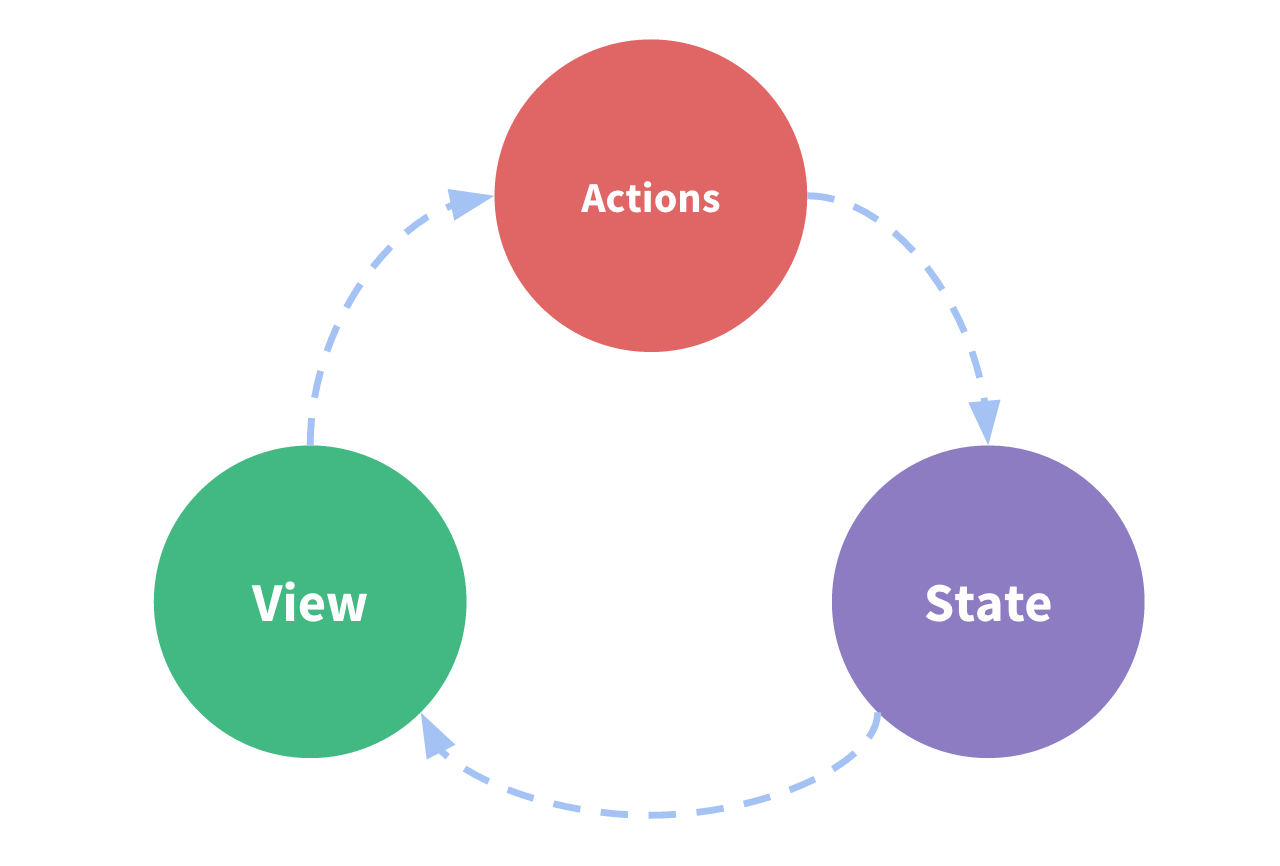
这个状态管理应用包含以下几个部分:

  • state: 驱动应用的数据源
  • view: 以声明方式将 state 映射到试图
  • actions: 响应在 view 上的用户输入导致的状态变化

以下是一个表示单项数据流理念的简单示意图:

flow

当我们遇到多个组件共享状态时, 单项数据流的简洁性很容易被破坏:

  • 多个视图依赖于同一状态
  • 来自不同视图的行为需要变更同一状态

对于问题一, 传参的方法对于多层嵌套的组件将会非常繁琐, 并且对于兄弟组件间的状态传递无能为力
对于问题二, 我们经常会采用父子组件直接引用或者通过事件来变更和同步状态的多份拷贝.

因此, 我们为什么不把组件的共享状态抽取出来, 以一个全局单例模式管理呢? 在这种模式下, 我们组件树构成了一个巨大的试图, 不管树在那个位置, 任何组件都能获取状态或者触发行为.

通过定义和隔离状态管理中的各种概念并通过强制规则维持试图和状态间的独立性,我们的代码将会变得更结构化且易维护

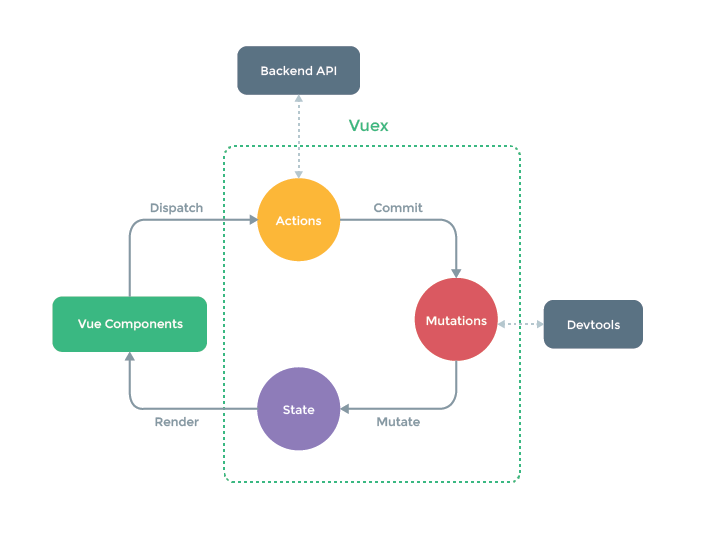
这就是 Vuex 背后的基本思想,借鉴了 Flux、Redux 和 The Elm Architecture。与其他模式不同的是,Vuex 是专门为 Vue.js 设计的状态管理库,以利用 Vue.js 的细粒度数据响应机制来进行高效的状态更新

vuex

什么情况下应该使用 Vuex?

Vuex 可以帮助我们管理共享状态,并附带了更多的概念和框架。这需要对短期和长期效益进行权衡。

如果您不打算开发大型单页应用,使用 Vuex 可能是繁琐冗余的。确实是如此——如果您的应用够简单,您最好不要使用 Vuex。一个简单的 store 模式就足够您所需了。但是,如果您需要构建一个中大型单页应用,您很可能会考虑如何更好地在组件外部管理状态,Vuex 将会成为自然而然的选择。

开始

每个 Vuex 应用的核心就是 store. store 基本上就是个容器, 它包含着你的应用中大部分的状态(state). Vuex 和单纯的全局对象有以下两个点不同

  1. Vuex 的状态存储是响应式的. 当 Vue 组件从 store 中读取状态的时候, 若 store 中的状态发生改变, 那么相应的组件也会响应的得到高效更新

  2. 不能直接修改 store 中的状态. 改变 store 中的状态的唯一途径就是显示的提交(commit)mutation. 这样使得我们可以方便的跟踪没一个状态的变化, 从而让我们能够实现一些工具帮助我们更好的了解我们的应用

使用

安装 Vuex 之后, 我们可以创建一个 store.

1
2
3
4
5
6
7
8
9
10
const store = new Vuex.Store({
state: {
count: 0,
},
mutations: {
increment(state) {
state.count++
},
},
})

现在, 可以通过 store.state 来获取状态对象, 以及通过 store.commit 方法触发状态变更

1
2
store.commit('increment')
console.log(store.state.count) // -> 1

我们通过提交 mutation 的方式,而非直接改变 store.state.count,是因为我们想要更明确地追踪到状态的变化。这个简单的约定能够让你的意图更加明显,这样你在阅读代码的时候能更容易地解读应用内部的状态改变。此外,这样也让我们有机会去实现一些能记录每次状态改变,保存状态快照的调试工具。有了它,我们甚至可以实现如时间穿梭般的调试体验。

由于 store 中的状态是响应式的, 在组件中调用 store 中的状态简单到仅需要在计算属性中返回即可. 触发变化也仅仅是在组件的 methods 中提交 mutation

路由对象

一个路由对象表示当前激活的路由的状态信息, 包含了当前 URL 解析得到的信息, 还有 URL 匹配到的路由记录

路由对象是不可变的, 每次成功导航后都会产生一个新的对象

路由对象出现在多个地方:

  • 组件内, this.$route

  • $route 观察者回调内

  • router.match(localtion) 返回值

  • 导航守卫的参数:

    1
    2
    3
    router.beforeEach((to, from, next) => {
    // to 和 from 都是路由对象
    })
  • scrollBehavior 方法的参数:

    1
    2
    3
    4
    5
    const router = new VurRouter({
    scrollBehavior(to, from, savedPosition)=> {
    // to 和 from 都是路由对象
    }
    })

路由对象属性

  • $route.path
    • 类型: string
      字符串, 对应当前路由的路径, 总是解析为绝对路径,如: ‘/foo/bar’
  • $route.params
    • 类型: Object
      一个 key/value 对象, 包含了动态片段和全匹配片段, 如果没有路由参数, 就是一个空对象
  • $route.query
    • 类型: Object
      一个 key/value 对象,表示 URL 查询参数。例如,对于路径 /foo?user=1,则有 $route.query.user == 1,如果没有查询参数,则是个空对象。
  • $route.hash
    • 类型: string
      当前路由的 hash 值(带#), 如果没有 hash 值, 则为空字符串
  • $route.fullPath
    • 类型: string
      完成解析后的 url, 包含查询参数核 hash 的完整路径
  • $route.matched
    • 类型: Array
      一个数组,包含当前路由的所有嵌套路径片段的路由记录 。路由记录就是 routes 配置数组中的对象副本 (还有在 children 数组)。
当 URL 为 `/foo/bar`,`$route.matched` 将会是一个包含从上到下的所有对象 (副本)。
1
2
3
4
5
6
7
8
9
10
11
12
13
const router = new VueRouter({
routes: [
// 下面的对象就是路由记录
{
path: '/foo',
component: Foo,
children: [
// 这也是个路由记录
{ path: 'bar', component: Bar }
]
}
]
})
  • $route.name
    当前路由的名称

  • $route.redirectedFrom
    如果存在重定向, 即为重定向来源的路由的名字

组件注入

注入的属性

通过在 Vue 根实例的 router 配置传入 router 实例,下面这些属性成员会被注入到每个子组件。

  • this.$router

  • router 实例。

  • this.$route

当前激活的路由信息对象。这个属性是只读的,里面的属性是 immutable (不可变) 的,不过你可以 watch (监测变化) 它。

增加的组件配置选项

  • beforeRouteEnter

  • beforeRouteUpdate

  • beforeRouteLeave

Router 实例属性

  • router.app

  • 类型: Vue instance
    配置了 router 的 Vue 根实例

  • router.mode

  • 类型: string
    路由使用的模式

  • router.currentRoute

  • 类型 Route
    当前路由对应的路由信息对象

Router 实例方法

全局导航守卫

  • router.beforeEach

  • router.beforeResolv

  • router.afterResolve

  • router.afterEach

    函数签名:

    1
    2
    3
    4
    5
    6
    7
    8
    9
    10
    11
    // 都返回一个移除已注册的守卫/钩子的函数。

    router.beforeEach((to, from, next) => {
    /* 必须调用 `next` */
    })

    router.beforeResolve((to, from, next) => {
    /* 必须调用 `next` */
    })

    router.afterEach((to, from) => {})

动态导航到一个新的 URL

  • router.push

  • router.replace

  • router.go

  • router.back

  • router.forward

    函数签名:

    1
    2
    3
    4
    5
    6
    7
    router.push(location, onComplete?, onAbort?)
    router.push(location).then(onComplete).catch(onAbort)
    router.replace(location, onComplete?, onAbort?)
    router.replace(location).then(onComplete).catch(onAbort)
    router.go(n)
    router.back()
    router.forward()

返回目标位置或当前路由匹配的组件数组

  • router.getMatchedComponents

    函数签名:

    1
    2
    // 通常在服务端渲染的数据预加载时使用。
    const matchedComponents: Array<Component> = router.getMatchedComponents(location?)

解析目标位置

  • router.resolve

    函数签名:

    1
    2
    3
    4
    5
    const resolved: {
    location: Location;
    route: Route;
    href: string;
    } = router.resolve(location, current?, append?)

    解析目标位置 (格式和 的 to prop 一样)

  • current 是当前默认的路由 (通常你不需要改变它)

  • append 允许你在 current 路由上附加路径 (如同 router-link)

动态添加更多的路由规则

  • router.addRoutes

    函数签名:

    1
    2
    // 动态添加更多的路由规则。参数必须是一个符合 routes 选项要求的数组。
    router.addRoutes((routes: Array<RouteConfig>))

router.onReady

该方法把一个回调排队,在路由完成初始导航时调用,这意味着它可以解析所有的异步进入钩子和路由初始化相关联的异步组件。
这可以有效确保服务端渲染时服务端和客户端输出的一致。
第二个参数 errorCallback 只在 2.4+ 支持。它会在初始化路由解析运行出错 (比如解析一个异步组件失败) 时被调用。

函数签名:

1
router.onReady(callback, [errorCallback])

router.onError

注册一个回调,该回调会在路由导航过程中出错时被调用。注意被调用的错误必须是下列情形中的一种:

  • 错误在一个路由守卫函数中被同步抛出;

  • 错误在一个路由守卫函数中通过调用 next(err) 的方式异步捕获并处理;

  • 渲染一个路由的过程中,需要尝试解析一个异步组件时发生错误。

函数签名:

1
router.onError(callback)

routes

  • 类型: Array
    RouteConfig 的类型定义:

    1
    2
    3
    4
    5
    6
    7
    8
    9
    10
    11
    12
    13
    14
    15
    16
    interface RouteConfig = {
    path: string,
    component?: Component,
    name?: string, // 命名路由
    components?: { [name: string]: Component }, // 命名视图组件
    redirect?: string | Location | Function,
    props?: boolean | Object | Function,
    alias?: string | Array<string>,
    children?: Array<RouteConfig>, // 嵌套路由
    beforeEnter?: (to: Route, from: Route, next: Function) => void,
    meta?: any,

    // 2.6.0+
    caseSensitive?: boolean, // 匹配规则是否大小写敏感?(默认值:false)
    pathToRegexpOptions?: Object // 编译正则的选项
    }

mode

  • 类型: string
  • 默认值: hash | abstract
  • 可选值: hash | history | abstract
    配置路由模式:
    • hash: 使用 URL hash 值来作路由. 支持所有浏览器, 包括不支持 HTML5 History Api 的浏览器
    • history: 依赖 HTML5 History API 和服务器配置
    • abstract: 支持所有 JavaScript 运行环境, 如 Node.js 服务器端, 如果发现没有浏览器的 API, 路由会自动强制进入这个模式

base

  • 类型: string
  • 默认值: ‘/‘
    应用的基路径, 例如, 如果整个单页应用服务在 /app/ 下, 然后 base 就应该设为 /app/

linkActiveClass

  • 类型: string
  • 默认值: router-link-active
    全局配置 <router-link> 默认的激活 class

linkExactActiveClass

  • 类型: string
  • 默认值: router-link-exact-active
    全局配置 <router-link> 默认的精确激活的 class

scrollBehavior

  • 类型: Function
    签名:

    1
    2
    3
    4
    5
    6
    7
    8
    9
    10
    type PositionDescriptor =
    { x: number, y: number } |
    { selector: string } |
    ?{}

    type scrollBehaviorHandler = (
    to: Route,
    from: Route,
    savedPosition?: { x: number, y: number }
    ) => PositionDescriptor | Promise<PositionDescriptor>

parseQuery / stringifyQuery

  • 类型: Function
    提供自定义查询字符串的解析/反解析函数

fallback

  • 类型: boolean
    当浏览器不支持 history.pushState 控制路由是否应该回退到 hash 模式. 默认为 true